
- Safe connection
- 256-bit secure
- 4.3/5 from real customers
- 70,000+ visas done
How to Check Your Singapore Visa Status
A quick, 3-step guide to checking your application, downloading your approved visa, and retrieving your invoice. No login, no password, under 2 minutes.
What's new
We've recently upgraded to a new OTP-based verification system for a faster and more secure experience. You no longer need to log in to check your visa status.
Simply visit our Status Check page, enter your email address, and we'll send you a one-time password (OTP). Use the OTP to instantly access your visa status, download your approved visa, and retrieve your invoice, all without needing an account or password.
Secure by default
Each OTP is single-use and expires in 10 minutes. Only the person with access to your inbox can view your application.
No password to remember
We removed the login step entirely. All you need is the email address you used to apply.
Visa & invoice in one place
Download your approved eVisa PDF and your payment invoice directly from the same page.
Check your status in 3 simple steps
01
Open the Status Check page
Visit singaporevisaonline.sg/status/ from any browser. It works on phone, tablet, and desktop, no app required.
Bookmark this link. It's the only page you need to track any application you've ever submitted with us.
02
Enter your email and request an OTP
Type the email address you used when applying and click Send OTP. A 6-digit one-time password will arrive in your inbox within seconds.
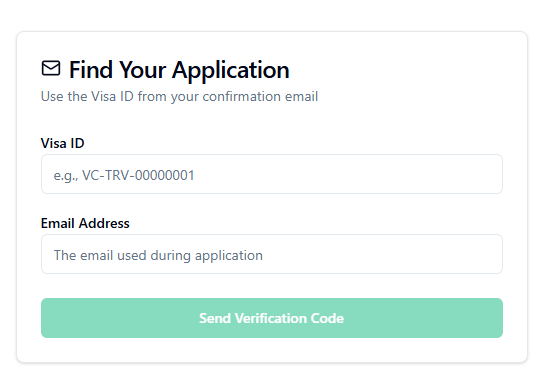
Can't find the email? Check your spam or promotions folder. Corporate email servers sometimes filter automated mail, so a personal Gmail or Yahoo address is often the fastest.
03
Enter the OTP to view your status
Type the 6-digit code into the page. You'll be taken straight to your application, where you can see its status, download your approved eVisa PDF, and retrieve your invoice.
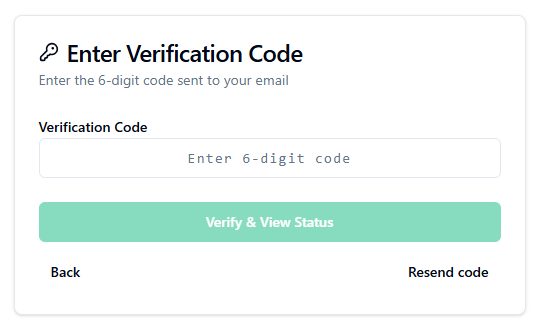
Each OTP is single-use. If you close the page and return later, just request a new code, there's no need to reset anything.
Ready to check your status?
It takes under 2 minutes. No account, no password, just your email.
What you can do from the Status page
📌 See your current status
Pending Review, On Hold, Documents Re-review, On Process, Approved, Disapproved, or Cancelled.
⬇️ Download your approved eVisa
🧾 Retrieve your invoice
Download a PDF invoice for your records or for reimbursement from your employer.
💬 Contact support instantly
If anything looks off, message our team on WhatsApp from the same page. Average reply time is under 15 minutes.
Frequently asked questions
No. We removed the old login system. The OTP sent to your email is all the verification you need.
Each one-time password expires 10 minutes after it's generated. If yours expires, just click "Resend code" and a new one will be sent instantly.
Enter the email address you actually used on your application, that's where the OTP will be sent. If you no longer have access to that inbox, contact our support team and we'll verify your identity through other details.
Yes. Once you verify with the OTP, the status page lists every application linked to that email so you can switch between them.
Yes. OTPs are 6-digit, single-use, and expire quickly. They're only sent to the email address on the application, so only the applicant (or someone with inbox access) can view the status. No password means there's nothing to leak in a data breach.
Check your spam or promotions folder first. If it's still missing after 2 minutes, click "Resend code". If you continue to have issues, your email provider may be filtering our mail, message us on WhatsApp and we'll send it manually.
Only if they have access to your inbox. This is intentional, it keeps your personal data and passport details safe without requiring a shared password.