
- Safe connection
- 256-bit secure
- 4.3/5 from real customers
- 70,000+ visas done
Passport Requirements & Upload Guide
A clean, well-lit photo of your passport bio page is the single biggest reason Singapore eVisa applications get approved on the first try. Here is exactly what we need, with a sample, smart auto-fill, and the rejection reasons we see most often.
⚡ Smart auto-fill from your scan
📷 Phone photo or scanner, both work
🔒 Encrypted and never resold
What makes a great passport upload
- Bio data page only (the page with your photo)
- All four corners visible, page lying flat
- Sharp focus, no glare, no shadows
- Both lines of MRZ code at the bottom in frame
- JPG, PNG or PDF, between 100 KB and 5 MB
- Passport valid 6+ months from your arrival date
Smart Auto-Read: Your Form Fills Itself
The moment you upload your passport scan, our system reads the machine-readable zone at the bottom of the bio page and pulls your details directly into the application. You do not type your name, date of birth, passport number or expiry date by hand. This is the same technology used at airport e-gates.
Upload once, fields auto-filled
Our reader works on every internationally recognised passport, including those with Cyrillic, Arabic, Chinese or other non-Latin scripts on the upper half of the bio page. It reads the standard Latin-script MRZ at the bottom, which is the same on every passport in the world.
Add your travel dates and contact information, about three minutes, and you are done.
Automatically filled
| ✓Full name | EXACTLY AS PRINTED |
| ✓Date of birth | DD-MMM-YYYY |
| ✓Passport number | A1234567 |
| ✓Expiry date | DD-MMM-YYYY |
| ✓Nationality | 3-letter code |
| ✓Sex | M / F / X |
Sample Passport Upload
Here is what a great passport scan looks like, side-by-side with the most common mistakes we reject. Use the good one as your reference when you take your photo.
✓ Do this
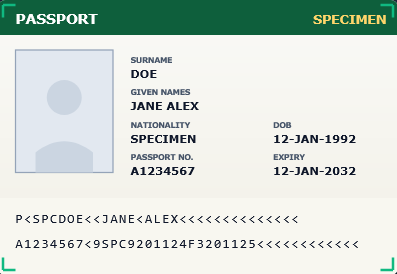
- Whole bio page in frame, all four corners visible
- Sharp focus, every field is readable
- MRZ (the two lines at the bottom) fully captured
- Even lighting, no glare across the laminate
- Color photo, taken straight on (not at an angle)
✕ Avoid this
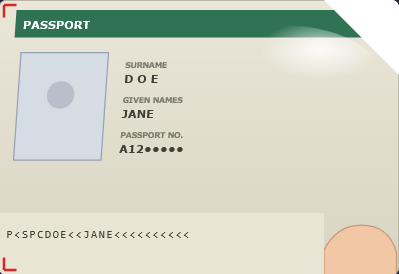
- Top-right corner cropped out of frame
- Bright glare across the photo and laminate
- A finger covers the bottom-right of the page
- Page is at an angle, fields look slanted
- Only one line of MRZ visible, second line missing
Capture Tips: Take a Great Scan in 60 Seconds
Lay it flat
Open the passport at the bio page and press it gently flat. Place it on a dark or contrasting surface so the edges stand out.
Even light
Use natural daylight or a soft indoor light. Avoid direct overhead lamps and flash, both of which create glare on the laminate.
Phone parallel
Hold your phone directly above the page, parallel to it. Tap the photo to focus, wait until the text is sharp.
All four corners
Check that all four corners of the bio page are inside the frame, including the two MRZ lines at the bottom.
Tip. If your phone has a built-in document scanner (most do), use it. It auto-corrects the angle, crops the page and gives you the cleanest result with one tap.
File Specifications
Most modern phone photos and document scans land inside these limits without any tweaking. If your file is too large, our system compresses it automatically.
| Spec | Accepted | Notes |
|---|---|---|
| File format | JPG, JPEG, PNG, PDF | Single-page PDFs are fine for scanner output. |
| File size | 100 KB to 5 MB | Smaller files often mean blurry scans, larger ones get compressed. |
| Color | Color (RGB) | Grayscale and black-and-white scans are not accepted. |
| Resolution | 300 DPI or higher | Phone photos already exceed this. For scanners, set 300 DPI. |
| Orientation | Landscape, page upright | Bio page in normal reading direction, rotate before upload. |
| What to capture | Bio data page only | Do not upload the cover, visa pages or blank pages. |
Passport Validity Rules for Singapore
These are the rules Singapore's Immigration & Checkpoints Authority applies to every visitor, regardless of nationality. We check them for you before submission, but it saves time if your passport already meets them.
Valid 6+ months from arrival
Your passport must be valid for at least six months from the date you intend to enter Singapore.
2 blank facing pages
Singapore needs at least one full spread of blank visa pages for the entry stamp.
Internationally recognised
Passport must be issued by your country's official authority and recognised by the Government of Singapore.
Bio page intact
Photo, name, number, expiry and MRZ all clearly visible. No tears, water damage or peeling laminate.
Machine-readable
The two-line MRZ at the bottom of the bio page must be present and undamaged.
No emergency travel docs
Emergency, temporary or single-journey travel documents are generally not accepted for the standard tourist eVisa.
Damaged passport warning. Even with a valid eVisa, damaged or worn passports can be refused at the Singapore border. If your bio page has any tears, water damage, peeling lamination or a missing corner, please replace your passport before applying. When in doubt, send us a photo on WhatsApp first.
Most Common Rejection Reasons
If your scan does not pass our internal review, we will message you within minutes and ask for a fresh upload. Here are the issues we see most often, ranked by how frequently they appear.
| Issue | What goes wrong | Quick fix |
|---|---|---|
| Glare on the laminate | Bright spot covers your photo or fields | Tilt the passport, retake |
| Cropped corner | One or more corners outside the frame | Step back, capture full page |
| Out of focus | Text is fuzzy, MRZ unreadable | Tap to focus before shooting |
| Wrong page | Visa, blank or cover page uploaded | Open to bio page, retry |
| Finger or object in frame | Hand or pen blocks part of the page | Use a flat surface, retake |
| Validity under 6 months | Passport expires too soon for entry | Renew passport first |
| Black and white scan | Color is required for ICA | Switch scanner to color |
| Heavy compression | Screenshot or messaging-app image | Upload original file from gallery |
Privacy & Security
Encrypted upload: your passport scan is sent over a TLS 1.3 connection. It cannot be intercepted in transit.
Used only for your application: the file is opened to extract your details and to attach to your eVisa submission. Nothing else.
Never resold: we do not sell, share or licence your passport image to any third party for any purpose.
Removed after decision: after Singapore's ICA issues a decision on your visa, your passport scan is moved out of active storage according to the timeline in our Privacy Policy.
Strict access controls: only authorised application-processing staff can view your scan, and every access is logged.
No card or password fields are ever near the upload: if anyone ever asks for your passport plus a password or one-time code on the same screen, that is not us. Report it immediately.
Heads up. Never email your passport scan to a stranger or post it in any public forum. Even after travel, your passport bio page is enough for identity fraud.
Frequently Asked Questions
Your passport must be valid for at least six months from the date you intend to enter Singapore. If your passport expires sooner, renew it before applying. The application will not pass ICA's automated checks if the validity is too short.
Upload only the bio data page, the page with your photo, full name, date of birth, passport number, expiry date and the two lines of machine-readable code (MRZ) at the bottom. Do not upload visa pages, blank pages or the cover.
JPG, JPEG, PNG and PDF are all accepted. The file should be between 100 KB and 5 MB. Most modern phone photos sit comfortably in this range. Avoid heavily compressed screenshots and avoid scanning at less than 200 DPI.
Yes. A flatbed or document scanner produces excellent results. Set the resolution to at least 300 DPI, save as colour (not grayscale or black and white) and export as JPG or PDF.
The auto-reader extracts your details from the machine-readable zone (MRZ) at the bottom of the bio page, which is always in Latin script on every internationally recognised passport. It works for travelers from every nationality we serve, even if the upper half of the page is in a different script.
Damaged or torn bio pages, blurred photos, water damage and missing corners are common reasons for entry refusal even with a valid eVisa. If your passport is damaged, please replace it before applying. If you are unsure, send us a photo on WhatsApp and we will tell you whether it will pass.
Singapore requires at least two facing blank pages (one full spread) for the entry stamp. If your passport is nearly full, renew it or get a passport-add booklet before traveling.
No. Your passport scan is encrypted in transit, used only to populate the application and submit it to ICA, and removed from our active storage after your visa decision. Read our Privacy Policy for the full retention schedule.